Ford Explorer: Storage Compartments / Cup Holders, Center Console & Overhead Console
Cup Holders
Note: Stow items in the cupholders carefully as items may become loose during hard braking, acceleration or crashes, including hot drinks which may spill.
Center Console
Carefully stow items in the center console as items may become loose during hard braking, acceleration or crashes.
Available console features include:
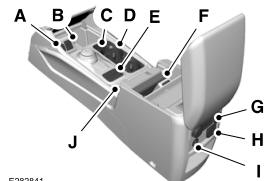
A - Auxiliary power point.
B - USB port.
C- Small item storage.
D - Cup holder.
E - Terrain control and hill descent control.
F - Auxiliary power point.
G - Rear climate controls.
H - Auxiliary power point.
I - USB smart charger or auxiliary power point.
J - Wireless charging area.
Overhead Console
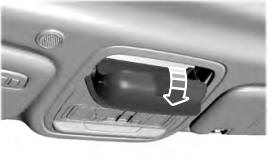
Press near the rear edge of the door to open it.


Other information:
Ford Explorer 2020-2026 Service Manual: Removal and Installation - Intake Manifold
Materials Name Specification Motorcraft® Silicone Brake Caliper Grease and Dielectric CompoundXG-3-A ESE-M1C171-A Removal NOTICE: The turbocharger compressor vanes can be damaged by even the smallest particles. When removing any turbocharger or engine air intake system component, ensure that no debris enters the system...
Ford Explorer 2020-2026 Owners Manual: Emission Law
WARNING: Do not remove or alter the original equipment floor covering or insulation between it and the metal floor of the vehicle. The floor covering and insulation protect occupants of the vehicle from the engine and exhaust system heat and noise...
Categories
- Manuals Home
- 6th Generation Explorer Owners Manual
- 6th Generation Explorer Service Manual
- General Procedures - Brake Service Mode Activation and Deactivation
- Auxiliary Power Points
- Engine - 2.3L EcoBoost (201kW/273PS)
- New on site
- Most important about car
Intelligent Access Key
Note: You may not be able to shift out of park (P) unless the intelligent access key is inside your vehicle.