
Ford Explorer: Wi-Fi Hotspot / Changing the Wi-Fi Hotspot Name or Password
Ford Explorer 2020-2026 Owners Manual / Wi-Fi Hotspot / Changing the Wi-Fi Hotspot Name or Password
 Press the button to enter the settings
menu.
Press the button to enter the settings
menu.
Select Connectivity Features.
Select Vehicle Hotspot.
Select Settings.
Select SSID: ___.
Enter your required SSID.
Select Done.
Select Password: ___.
Enter your required password.
Select Done.
 Creating a Wi-Fi Hotspot
You can create a Wi-Fi hotspot in your vehicle and allow devices to connect to
it for access to the Internet.
Press the button to enter the settings
menu...
 Audio System
..
Other information:
Ford Explorer 2020-2026 Owners Manual: About the Cabin Air Filter
Your vehicle has a cabin air filter, which gives you and your passengers the following benefits: It improves your driving comfort by reducing particle concentration. It improves the interior compartment cleanliness. It protects the climate control components from particle deposits...
Ford Explorer 2020-2026 Service Manual: Removal and Installation - Generator Pulley
Removal WARNING: Before beginning any service procedure in this section, refer to Safety Warnings in section 100-00 General Information. Failure to follow this instruction may result in serious personal injury. Follow the health and safety precautions...
Categories
- Manuals Home
- 6th Generation Explorer Owners Manual
- 6th Generation Explorer Service Manual
- Engine
- Fuel Filler Funnel Location & Running Out of Fuel
- Electric Parking Brake
- New on site
- Most important about car
Gauges
4 Inch Display
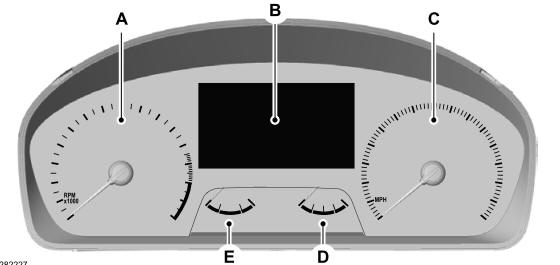
A - Tachometer.
B - Information display.
C - Speedometer.
D - Fuel gauge.
E - Engine coolant temperature gauge.

Copyright © 2026 www.foexplorer.com