
Kia Picanto: Lighting / Turn signals and lane change signals. One-touch lane change function: (if equipped). Rear fog light: (if equipped)
Turn signals and lane change signals. One-touch lane change function: (if equipped)
|
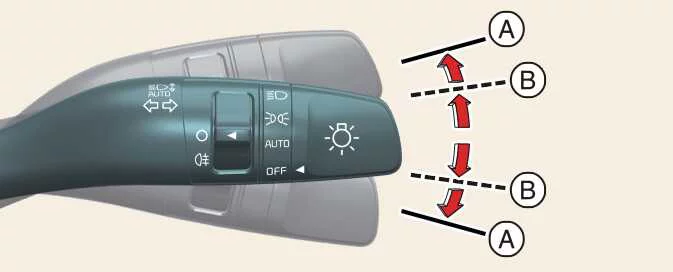
The ignition must be switched on for the turn signals to operate. Move the stalk upwards or downwards to the corresponding turn position (A) to signal your intended direction.
The green arrows on the instrument cluster show which turn signal is operating. After the turn is completed, the stalk normally returns automatically and the signal stops.
If the indicator continues flashing after the manoeuvre, return the stalk to its off position manually.
For a lane change, move the stalk slightly in the required direction and hold it at position (B). Release it after signalling; the stalk returns to the off position.
If an indicator remains steadily illuminated or flashes abnormally, a turn signal bulb may have failed and require replacement. Observe the indicator’s response whenever you use the signals.
One-touch lane change function: (if equipped)
To use the one-touch lane change function, move the turn signal stalk slightly and release it. The indicators continue flashing for the selected sequence of three to seven flashes, allowing you to signal without holding the stalk. Change the flash count through the Lights menu in User Settings mode.
NOTE
An unusually fast or slow flashing rate can indicate a failed bulb or a poor electrical connection in the turn signal circuit. Such a change should be investigated rather than treated as normal operation.
Rear fog light: (if equipped)
|
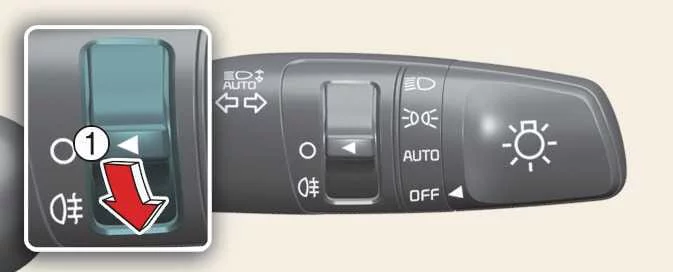
With the headlights switched on, turn the rear fog light switch (1) to its on position to illuminate the rear fog light.
The rear fog light can also operate with the main lighting switch in the parking light position, provided the front fog lights, where fitted, have first been switched on. Turn the rear fog light switch on after selecting those settings.
To switch the rear fog light off, return the fog light switch (1) to OFF.
NOTE
Where this arrangement is fitted, the rear fog light is provided only on the driver’s side of the vehicle.
 Lighting control. High beam operation
Lighting control
..
 Headlight levelling device : (if equipped)
Turn the headlight levelling switch to adjust the beam height for the number of occupants and the weig..
Other information:
Ford Explorer 2020-2026 Owners Manual: Navigation
Note: For more information, refer to our website. Select the navigation option on the feature bar. A Map view menu. B Zoom out. C Zoom in. D Route guidance menu. E Destination entry menu. Setting a Destination Destination Entry Menu Setting a Destination Using the Text Entry Screen A Text entry field...
Ford Explorer 2020-2026 Service Manual: General Procedures - Differential Fluid Level Check
Materials Name Specification Motorcraft® SAE 75W-140 Synthetic Rear Axle LubricantXY-75W140-QL WSL-M2C192-A Check With the vehicle in NEUTRAL, position it on a hoist. Refer to: Jacking and Lifting - Overview (100-02 Jacking and Lifting, Description and Operation)...
Categories
- Manuals Home
- 6th Generation Explorer Owners Manual
- 6th Generation Explorer Service Manual
- General Procedures - Rear Camber Adjustment
- Electric Parking Brake
- General Service Information
- New on site
- Most important about car
Gauges
4 Inch Display
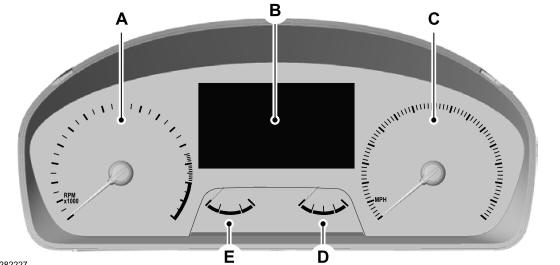
A - Tachometer.
B - Information display.
C - Speedometer.
D - Fuel gauge.
E - Engine coolant temperature gauge.
