Kia Picanto: Trip computer / Trip information (Trip computer) (For Type A cluster)
The trip computer is an electronically controlled driver information system that presents driving-related readings on the instrument cluster. In the Kia Picanto, it allows you to review journey information, monitor fuel economy and check the estimated distance available with the remaining fuel.
NOTE
Disconnecting the battery resets some information stored in the trip computer, such as average vehicle speed. Bear this in mind when comparing readings before and after a battery disconnection.
Trip Modes
|
A: TRIP A B: TRIP B
|
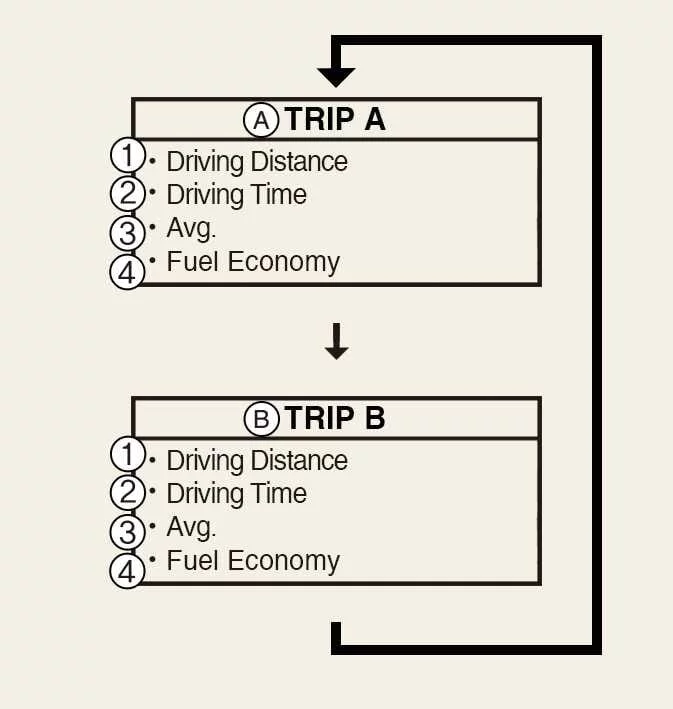
While trip computer mode is selected, use the MOVE scroll switch (∧/∨) or the TRIP button, according to the controls fitted to your vehicle, to move between the available trip displays.
|
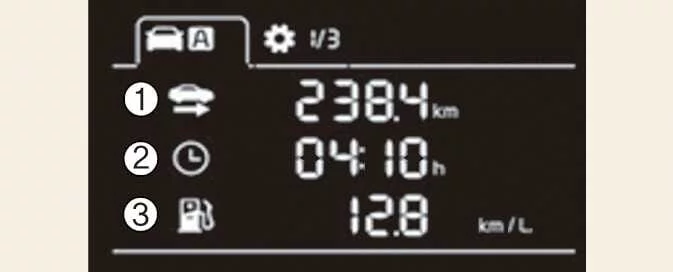
Distance To Empty (1)
-
Distance to empty is an estimate of how far your Kia Picanto can travel using the fuel remaining in the tank. Use the reading to help plan refuelling stops rather than treating it as a guaranteed driving range.
-
Display range: 1–9,999 km or 1–9,999 miles, depending on the distance unit used.
-
-
When the estimated remaining range falls below 1 km or 1 mile, the trip computer displays --- instead of a numerical distance-to-empty reading.
NOTE
-
The distance-to-empty function may not calculate correctly if the vehicle is not on level ground or if the battery supply has been interrupted.
-
The actual distance you can travel may differ from the displayed estimate. The reading represents a calculated remaining range and cannot account precisely for every subsequent driving condition.
-
If you add less than 6 litres (1.6 gallons) of fuel, the trip computer may not register the additional fuel. The displayed range may therefore not reflect a small refill.
-
Fuel economy and distance to empty can vary significantly with road and driving conditions, your driving habits and the condition of the vehicle. Allow for these changes when interpreting the readings.
Elapsed Time (2)
-
Elapsed time records the total driving time accumulated since this timer was last reset. It allows you to monitor the duration covered by the current recording period.
-
Time display range, hours:minutes: 00:00–99:59.
-
-
To clear the timer, display elapsed time and press and hold the RESET button or steering wheel OK button for more than one second, according to the controls fitted.
NOTE
The timer continues counting while the engine is running, even when the vehicle is stationary. The recorded total can therefore include time spent stopped with the engine operating.
Average Fuel Economy (3)
-
Average fuel economy is calculated using the total distance driven and fuel consumed since the average reading was last reset. It reflects consumption across that recording period rather than a single moment of driving.
-
Fuel economy display range: 0–99.9 in the applicable unit: L/100 km, km/L or MPG.
-
-
The average fuel economy reading supports both manual and automatic resetting. A manual reset lets you begin a new recording period when required.
-
Manual reset
To reset average fuel economy manually, first select its display. Press and hold the RESET button or steering wheel OK button for more than one second to clear the existing average and begin a new calculation.
NOTE
To support a more accurate calculation, the trip computer initially withholds the average fuel economy reading after the ignition switch or ENGINE START/STOP button is turned to ON. The reading is not displayed until the vehicle has been driven for more than 10 seconds or has covered 300 metres (0.19 miles).

 Trip information (trip computer) (For Type B cluster)
The Type B trip computer is an electronically controlled driver information system that displays journey data and
fuel economy readings. It allows you to review driving activity in your Kia Pican..
Other information:
Ford Explorer 2020-2026 Service Manual: Removal and Installation - Transmission Internal Wiring Harness
Special Tool(s) / General Equipment 307-625Fixture, Bench MountingTKIT-2008ET-FLMTKIT-2008ET-ROW 307-746Remover, Transmission Wiring Harness Connector Transmission Jack Vehicle/Axle Stands Wooden Block Materials Name Specification Motorcraft® MERCON® ULV Automatic Transmission FluidXT-12-QULV WSS-M2C949-A, MERCON® ULV Removal NOTE: I..
Ford Explorer 2020-2026 Service Manual: General Procedures - Transmission Fluid Drain and Refill
Special Tool(s) / General Equipment 307-570Tube, Transmission FillTKIT-2006U-F/FMTKIT-2006U-FLM/LMTKIT-2006U-ROW1TKIT-2006U-ROW2 Fluid Suction Gun Universal Fluid Dispenser Materials Name Specification Motorcraft® MERCON® ULV Automatic Transmission FluidXT-12-QULV WSS-M2C949-A, MERCON® ULV Draining NOTE: It is not necessary to remove the tra..
Categories
- Manuals Home
- 6th Generation Explorer Owners Manual
- 6th Generation Explorer Service Manual
- General Procedures - Rear Camber Adjustment
- Traction Control
- Driveline
- New on site
- Most important about car
Intelligent Access Key
Note: You may not be able to shift out of park (P) unless the intelligent access key is inside your vehicle.